
AEMaaCS vs AEM 6.5: What Developers Must Unlearn
If you are moving an AEM 6.5 project to AEM as a Cloud Service (AEMaaCS), the biggest changes are not in Java or Sling APIs. They are in how you configure, deploy, and troubleshoot. Code and OSGi configuration live in source control, reach environments only through Cloud Manager, and pass through a repeatable validation flow. This guide covers the habits that most often break migrations, what to do instead, and how to check each change before release.
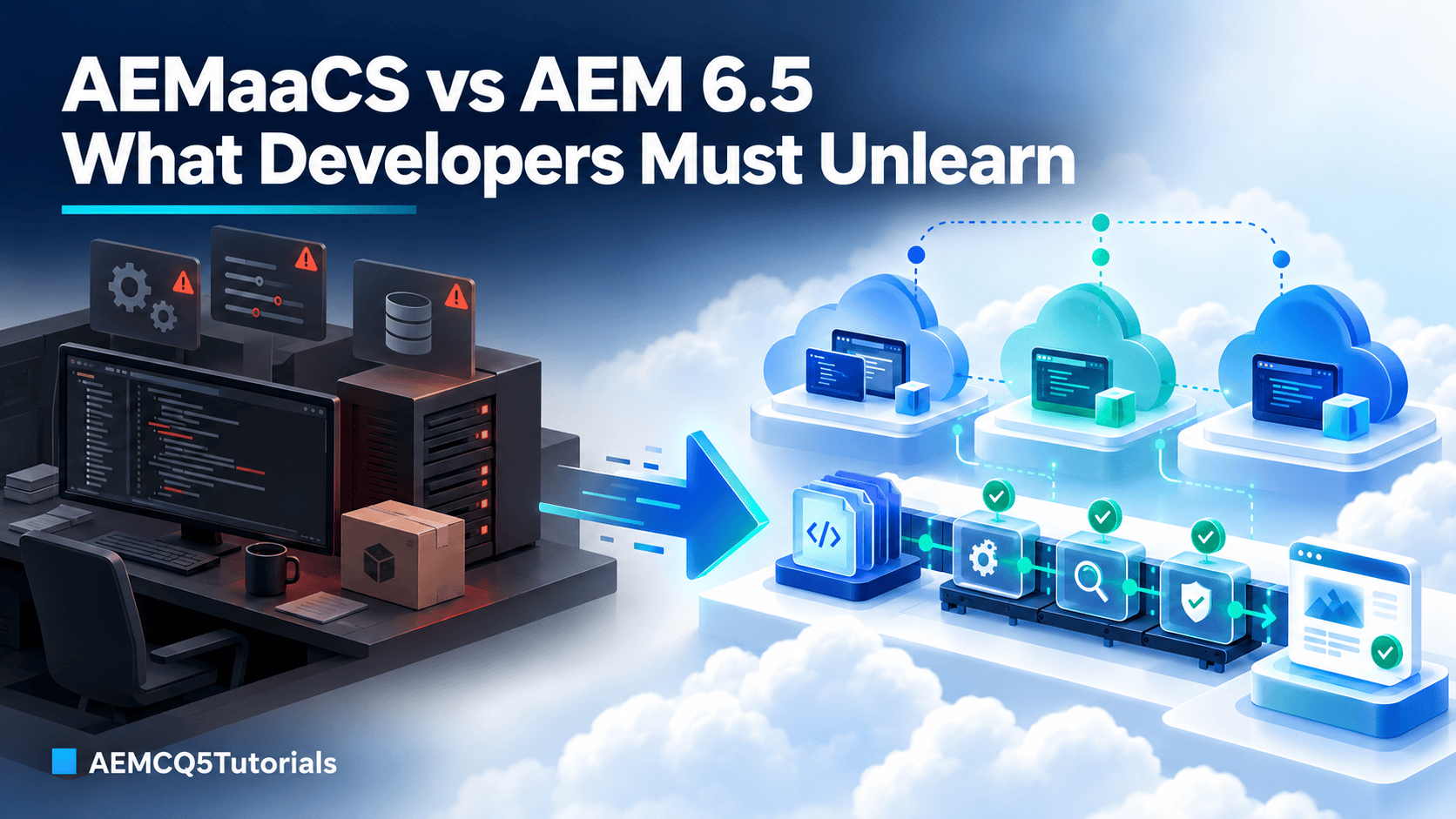
Table of contents
- Why this article matters
- Who should read this
- Prerequisites
- What changes when you move to AEMaaCS
- Immutable and mutable content
- What developers must unlearn
- How to use BPA and CAM to unlearn faster
- What to do instead
- Common migration mistakes
- Practical migration checklist
- Hands-on challenge
- Key takeaways
- Knowledge check
- Frequently asked questions
Why this article matters
Most AEM 6.5 developers do not struggle with the repository, components, or Sling basics. They struggle because the operating model is different. In traditional AEM 6.5 projects, especially on-premise or self-managed ones, teams often change configuration on a running instance, install packages directly, and debug on the server. AEMaaCS is a managed platform with clear environment boundaries, stricter release validation, and automatic AEM version updates. Habits that once saved time can now cause configuration drift, failed releases, or bugs that are hard to trace.
Who should read this
- AEM 6.5 developers preparing for an AEMaaCS migration.
- Developers working on code quality, deployment readiness, or release validation in cloud projects.
- Team leads who want a practical migration checklist before moving a project to AEMaaCS.
- Architects and technical reviewers who need a quick way to compare the old and new operating models.
Prerequisites
- Comfort with AEM repository concepts and Sling-based development.
- Basic familiarity with OSGi configuration, Dispatcher, and deployment packaging.
- Exposure to the AEM authoring and publishing flow.
- Access to current Adobe documentation for the exact AEMaaCS environment you are targeting.
What changes when you move to AEMaaCS
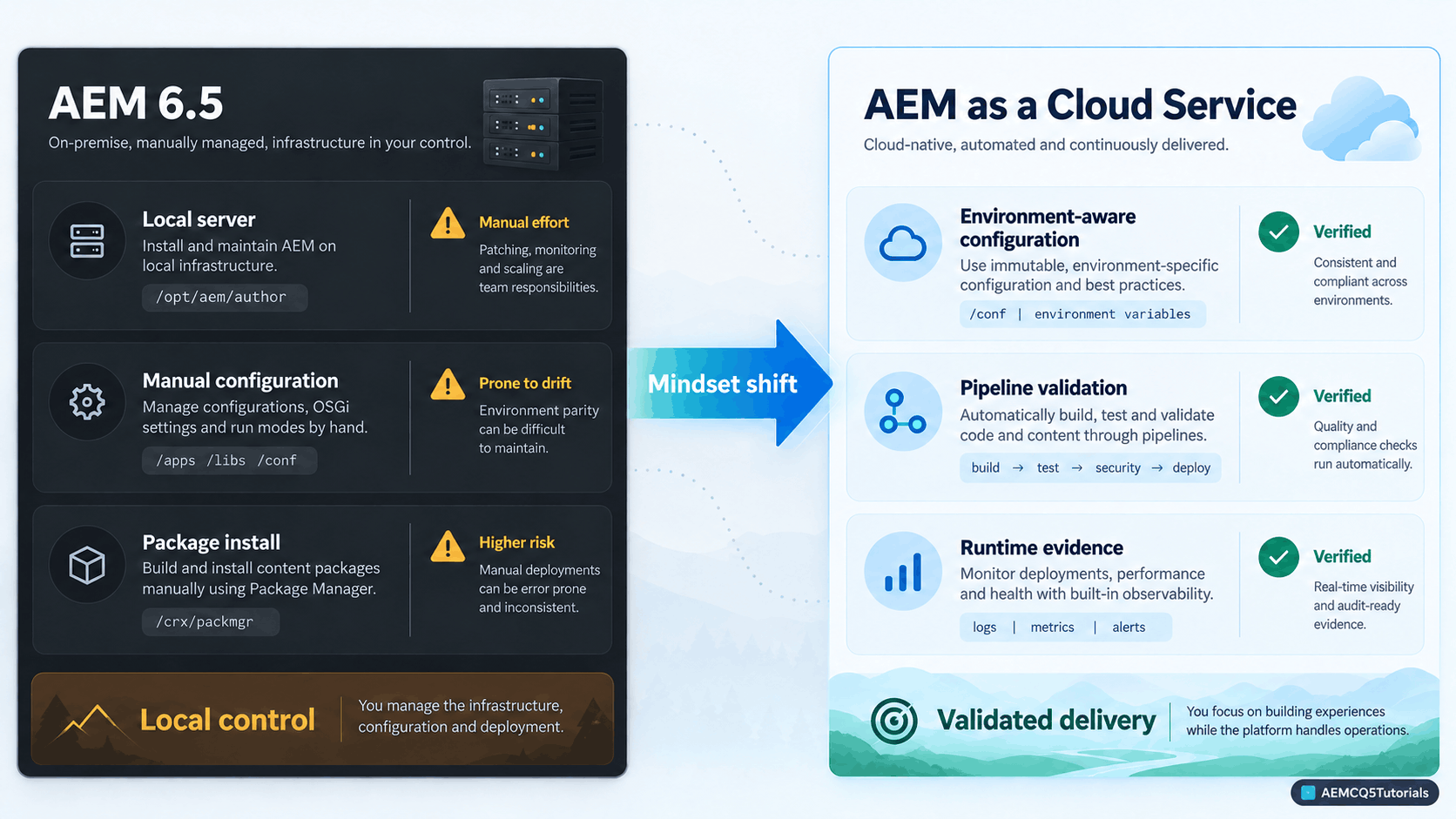
The main shift is where the effort goes. In AEM 6.5, much of the work centers on the instance: console changes, package installs, and server checks. In AEMaaCS, the work centers on code and configuration that move through Cloud Manager and are validated before they reach an environment.
| Area | AEM 6.5 pattern | AEMaaCS pattern |
|---|---|---|
| Configuration | Often adjusted directly in a running environment | Version-controlled, environment-aware, and validated configuration |
| Deployment | Package or direct-install patterns are common | Cloud Manager pipelines and validation are central |
| Debugging | Runtime inspection is often the first move | Logs, deployment evidence, effective configuration, and request-path analysis come first |
| Dispatcher and cache | Older rules can be reused more freely | Cache, CDN, routing, and invalidation need deliberate validation |
| Operations mindset | Team may operate like a server owner | Team works within a managed service lifecycle and platform boundaries |
Adobe’s deployment documentation states that Cloud Manager is now the only mechanism for deploying code to AEMaaCS dev, stage, and production environments. Code is never deployed directly to a running instance. The result is that every environment runs the same code for a given release.
Key takeaway: In AEM 6.5, teams often focus on controlling the runtime. In AEMaaCS, teams focus on producing cloud-safe code and configuration that pass a repeatable, environment-aware validation and delivery process.
Immutable and mutable content
AEMaaCS splits repository content into two groups. Knowing which group a change belongs to explains most migration failures.
- Immutable content is code, OSGi configuration, and anything else checked into Git. It is deployed through Cloud Manager, and the same build runs in every environment for a release.
- Mutable content is folders, service users, ACLs, node types, and index definitions. Cloud Manager installs it during the deployment, at specific points.
Cloud Manager installs mutable content in three stages:
- Before the new application version starts: index definitions (add, modify, remove).
- During startup, before switchover: service users, service user ACLs, and node types (add).
- After switchover: other content defined with Jackrabbit FileVault, such as folders (add, modify, remove).
Two more rules matter for migrations. Install hooks are not supported in AEMaaCS packages. Content that was stored under /etc must move to the correct location as described in Adobe’s repository restructuring guidance. Packages in Package Manager on cloud environments are converted, carry a cp2fm name, and cannot be downloaded or opened.

What developers must unlearn
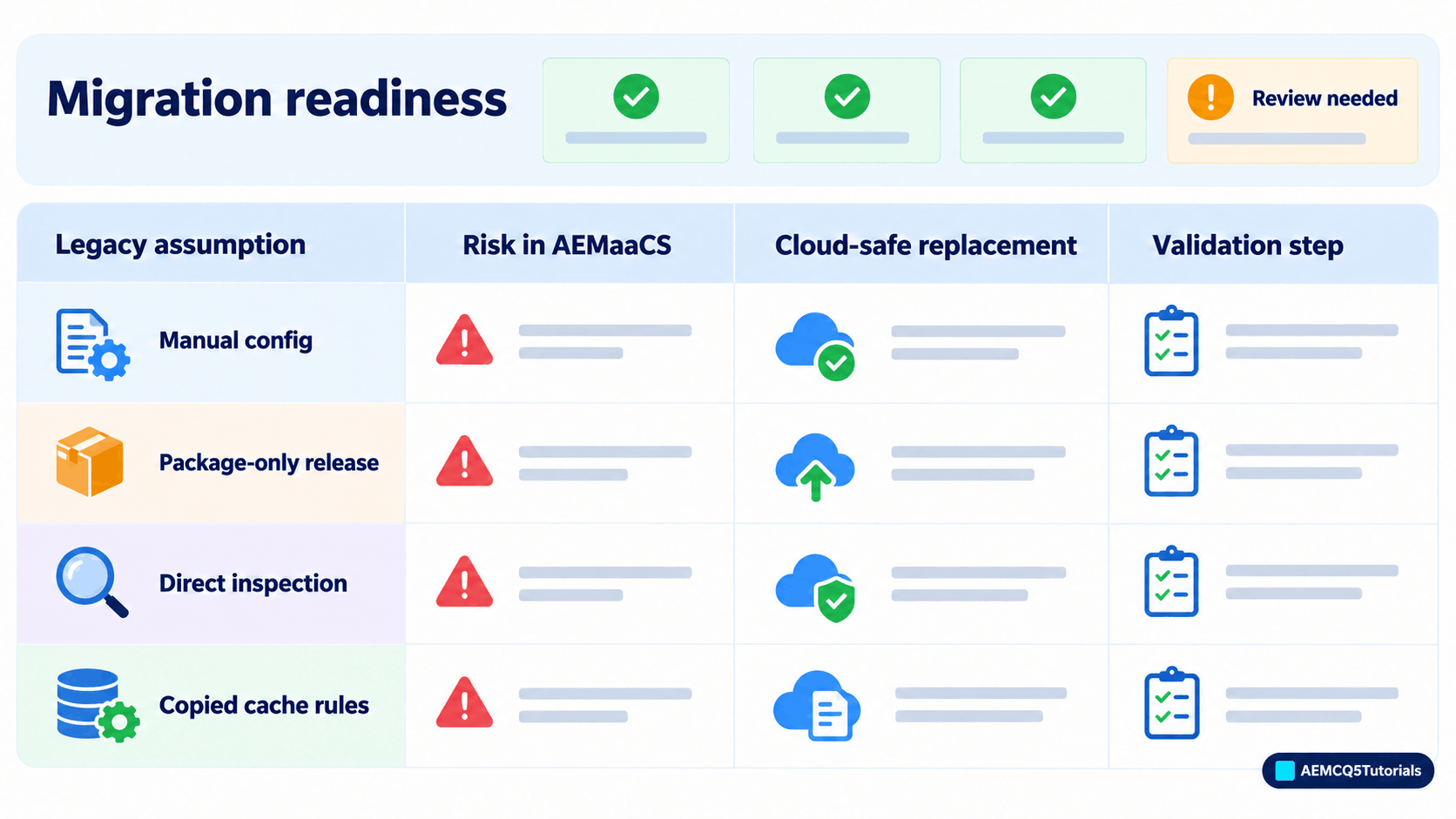
Each habit below works on a traditional AEM 6.5 instance and creates a risk in AEMaaCS. The table shows the cloud-safe replacement and how to validate it.
| Legacy habit | AEMaaCS risk | Cloud-safe replacement | How to validate |
|---|---|---|---|
| Changing OSGi values manually in a running environment | Configuration drift and unsupported runtime changes | Store stable values in source control; use approved environment variables or secrets where appropriate | Verify the effective value through environment diagnostics and release checks |
| Treating package installation as release success | Pipeline or runtime issues can be missed | Use build, code-quality, deployment, and smoke-test evidence as the release signal | Review pipeline output, logs, and target-environment behavior |
| Relying mainly on direct server inspection | The root cause can be missed across deployment, configuration, request, and cache layers | Use logs, deployment evidence, configuration checks, and request tracing | Follow the cloud-first troubleshooting flow |
| Copying Dispatcher or cache rules from AEM 6.5 | Cache behavior may not match the cloud delivery path | Review filters, cache rules, CDN behavior, TTL, headers, and invalidation | Test real requests and cache behavior in the target environment |
| Reusing old service-user, ACL, or repository assumptions | Permission drift, security gaps, or deployment problems | Review service-user mapping, repository initialization, and ACL ownership | Validate during deployment and functional testing |
1. Local behavior is not production behavior
Many teams build around a local author instance and assume it behaves like production. In AEMaaCS, the runtime runs inside managed infrastructure with a different topology, validation, and deployment flow. The question changes from “does it work locally?” to “does it behave correctly in the target environment, the way the platform expects?”
Rapid Development Environments help with fast feedback, but they do not replace the Cloud Manager release process for dev, stage, and production. Use them to debug, not to sign off a release.
For cloud-safe configuration patterns, read AEM as a Cloud Service Best Practices for OSGi Configs and Environment Variables.
2. Configuration is not a runtime-only patch
Legacy teams often make a quick change in the Configuration Manager and move on. In AEMaaCS, configuration needs control: it should be reviewed, named clearly, and validated before release. The real distinction is controlled configuration versus uncontrolled runtime change, not configuration versus code.
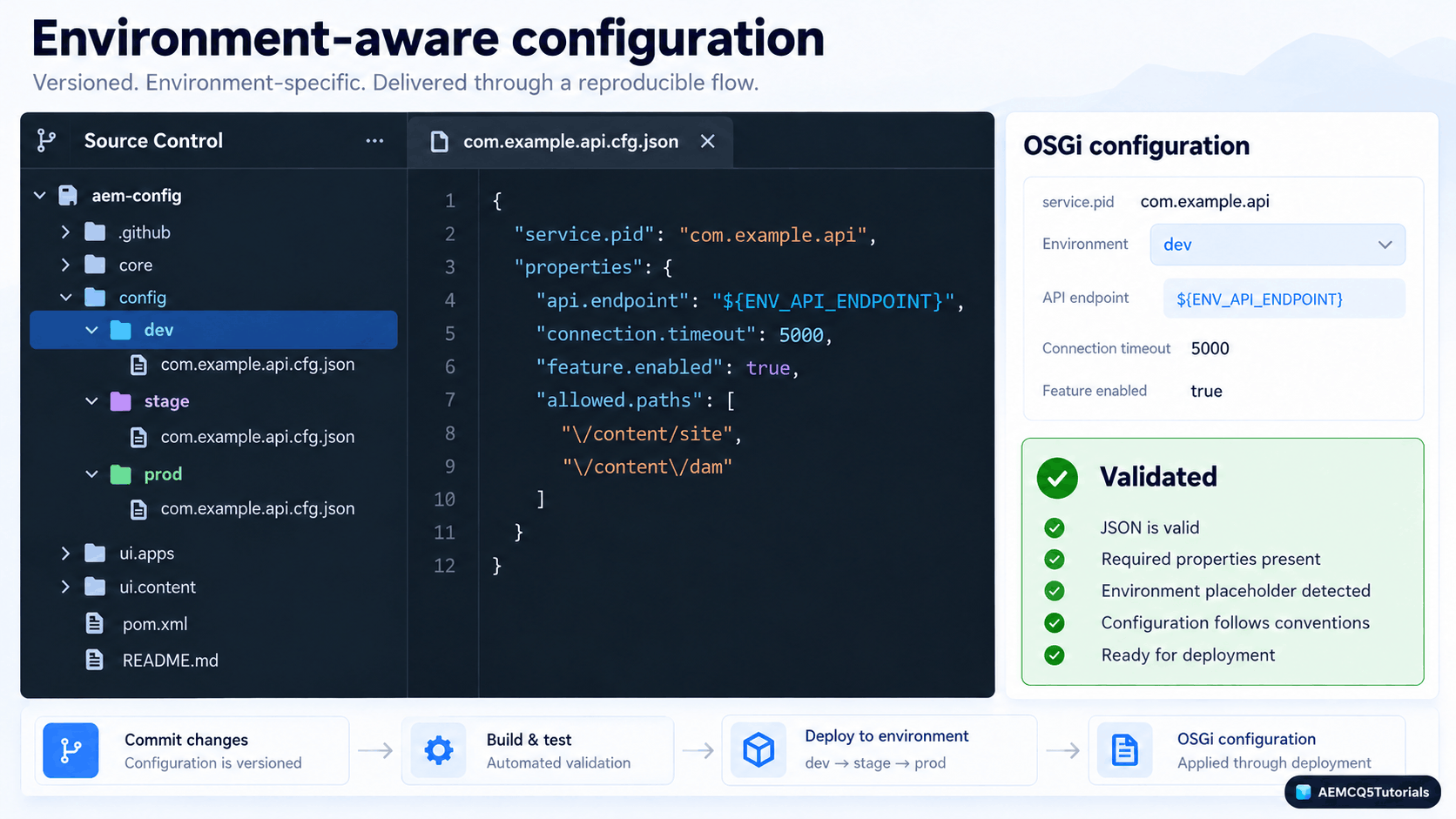
- Inline OSGi configuration belongs in source control when the values are stable and versioned with the project.
- Environment-specific values belong in Cloud Manager environment variables when they genuinely differ between dev, stage, and production.
- Secrets such as credentials, tokens, passwords, and private keys never go into Git. Manage them as secret-type environment variables in Cloud Manager.
Adobe’s guidance is to commit OSGi configuration to source control. Two common ways to create the file are: make the change locally in the Configuration Manager and export it into the project, or write the file by hand and use the Configuration Manager to confirm the property names. Here is an example file that mixes stable values with an environment variable:
com.aemcq5tutorials.core.config.SampleConfig.cfg.json
{
  "apiEndpoint": "$[env:SAMPLE_API_ENDPOINT]",
  "timeoutMs": 5000,
  "enabled": true
}
The timeout and feature flag are stable, so they stay in Git. The endpoint differs by environment, so it comes from a Cloud Manager variable. Environment variables should not become a shortcut for runtime edits in stage and production. The goal is configuration that stays visible and reviewable.
3. Package installation is not release readiness
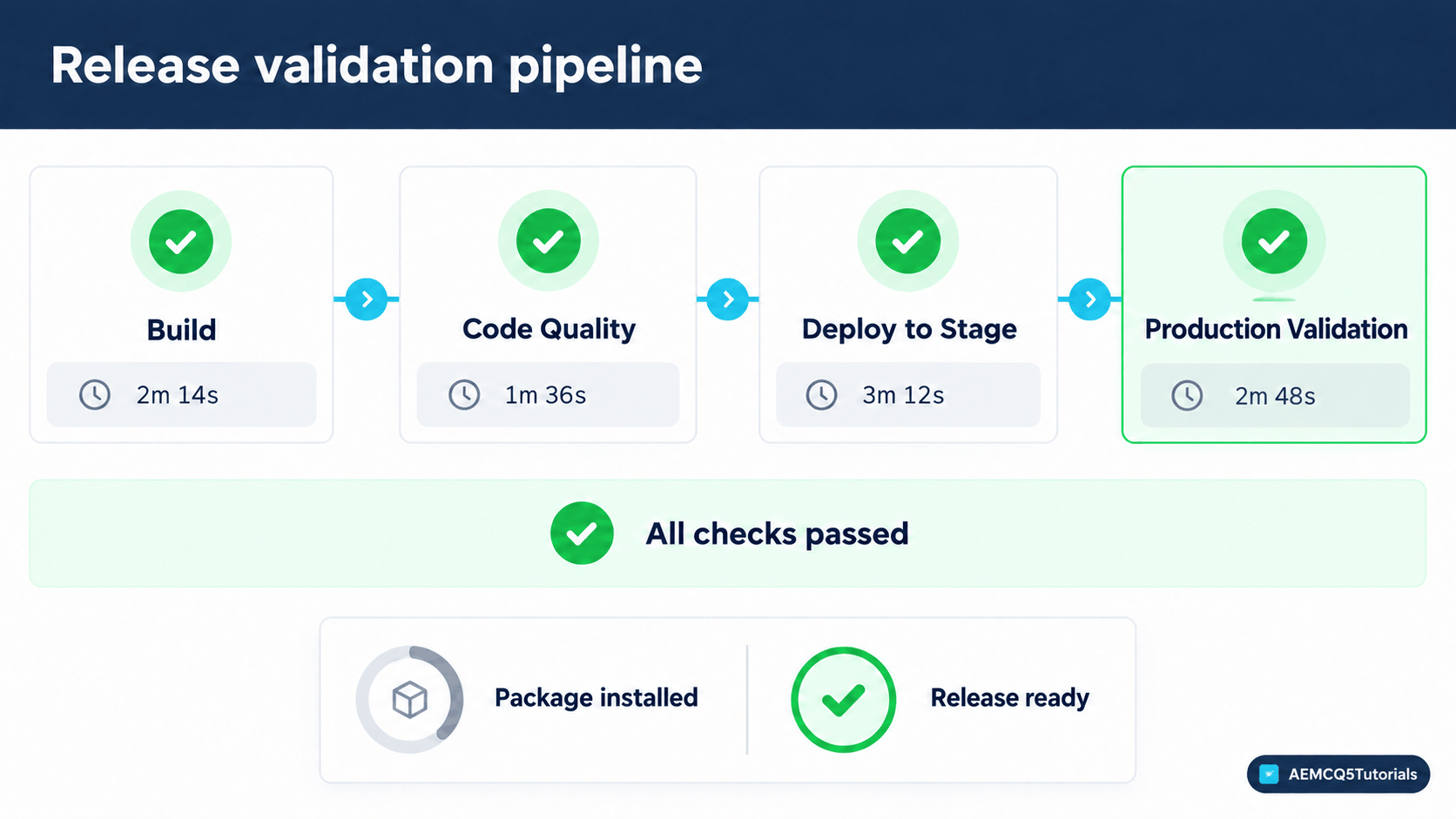
In older AEM delivery, a successful package install often marked the end of a deployment. In AEMaaCS, the package is one signal among several. A release is ready when it has:
- a successful build,
- passing code-quality and security checks,
- a clean Cloud Manager pipeline run,
- reviewed deployment output,
- runtime smoke tests on the target environment, and
- verified configuration for that environment.
Cloud Manager is part of the development workflow, not only a final step before production. Pipeline failures, environment-specific configuration problems, and runtime issues often show up only after deployment.
4. Debug from logs and evidence, not direct server inspection
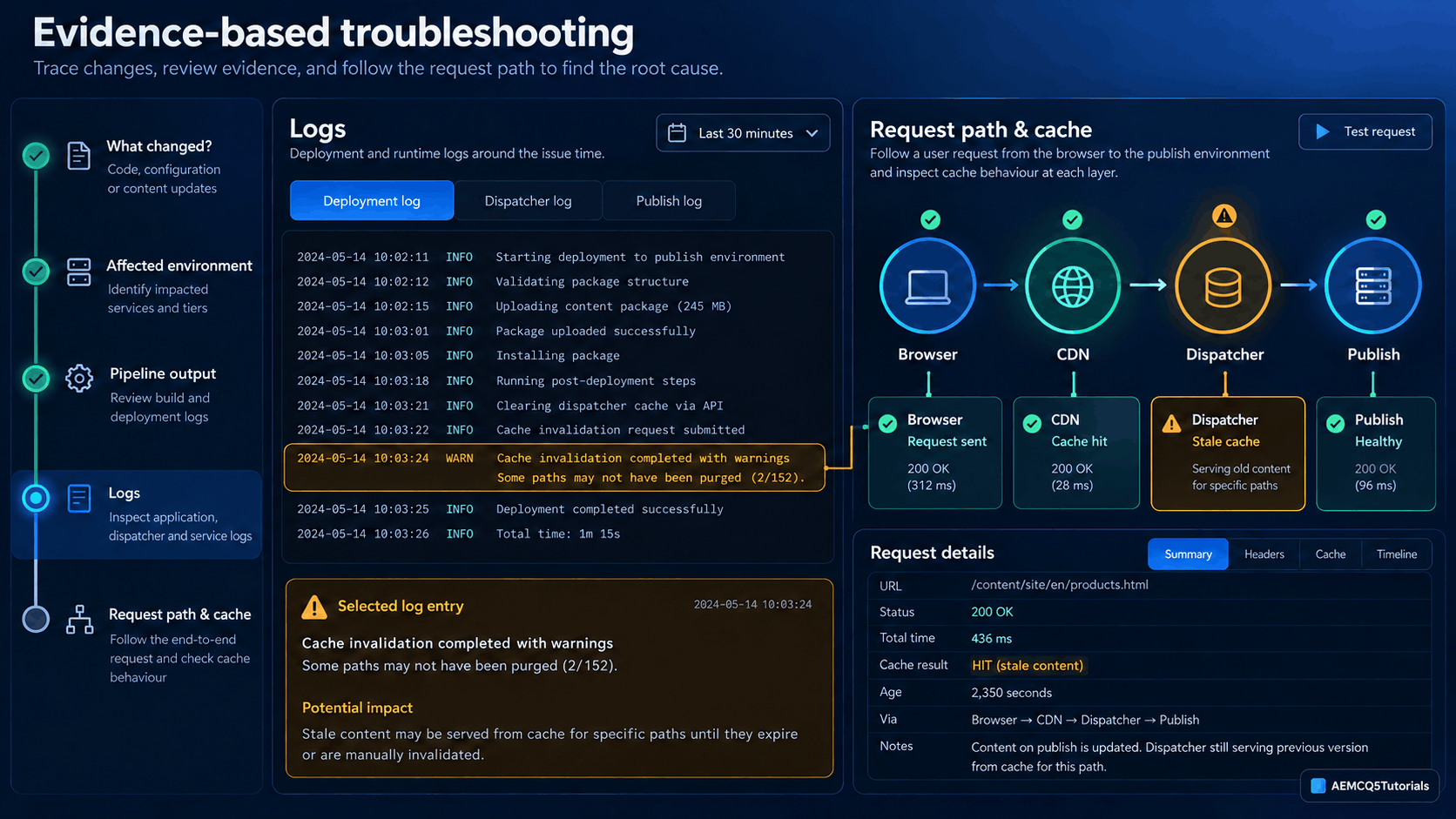
In AEM 6.5, developers often start with console access, local file checks, or a quick runtime inspection. In AEMaaCS, cloud troubleshooting relies on deployment evidence, logs, configuration checks, and request-path analysis instead. A practical debugging flow looks like this:
- Identify what changed.
- Identify the affected environment and service tier.
- Review the Cloud Manager pipeline or deployment output.
- Review the relevant application, Dispatcher, or runtime logs.
- Verify the effective OSGi configuration through the available environment diagnostics.
- Trace the request path and cache behavior before changing code or configuration.
For example, if a deployment looks correct but the page still behaves incorrectly, the question shifts from “what is on the server?” to “what did the pipeline do, what do the logs show, and what changed in the request flow or cache?”
For log-based diagnosis, see Tail Logs on AEM as a Cloud Service.
5. Check the request path before reusing Dispatcher and cache rules
Dispatcher and cache rules are often copied from older projects because they “worked before.” In AEMaaCS, they must be reviewed against the cloud delivery model. Teams that skip this step see content cached incorrectly, unexpected headers, or changes that affect only some environments. The issue is rarely “the server is broken.” It is usually a request path or cache assumption that no longer matches the platform.
Review the real request path, not just the rules in one folder. The checklist should cover:
- Requested URL, selectors, extension, suffix, and query parameters.
- Request headers, cookies, authentication state, and cache-control behavior.
- Which layer owns caching: Dispatcher, CDN, or both.
- Dispatcher filters, cache rules, TTL, and invalidation behavior.
- Differences between author, publish, preview, dev, stage, and production where they apply.
Do not assume that Browser → CDN → Dispatcher → Publish is the same in every project. Confirm the path for your program, and use the AEM as a Cloud Service Dispatcher Tools to validate rules before deployment.
6. Repository and permission patterns need a fresh review
Repository structure, service-user design, ACL ownership, and permissions are not details you can carry over unchanged. They affect deployment readiness, environment behavior, and supportability. Service users, their ACLs, and node types are mutable content, so Cloud Manager deploys them with the application. Adobe documents repoinit statements for this purpose. The example below is illustrative. Check Adobe’s current repoinit documentation for the exact syntax before using it in production.
org.apache.sling.jcr.repoinit.RepositoryInitializer-sample.cfg.json
{
  "scripts": [
    "create service user sample-reader\nset ACL on /content/sample\n  allow jcr:read for sample-reader\nend"
  ]
}
For practical guidance, see Create Service User in AEM As Cloud Service and the OSGi and environment variable guidance linked above.
7. AEM knowledge is necessary, but not enough
AEM 6.5 knowledge still matters. It gives you the foundation for Sling, components, repository behavior, and development patterns. AEMaaCS adds a layer of platform-managed behavior, environment planning, and release discipline. The best migration teams keep their fundamentals and change the operating model around them. The goal is not to preserve the most AEM 6.5 habits. It is to keep sound engineering judgment and replace the habits that do not fit a managed cloud platform.
How to use BPA and CAM to unlearn faster
If your team has access to migration assessment tools, use them during the transition. The Best Practices Analyzer (BPA) flags migration findings such as unsupported functionality, repository placement concerns, legacy configuration patterns, and refactoring needs. The Cloud Acceleration Manager (CAM) helps teams track migration readiness, assessment findings, and the next actions to modernize the application and delivery model.
Common findings include legacy operational dependencies, outdated deployment assumptions, configuration drift, cache-policy mismatches, and repository patterns that need modernizing. These tools do not replace engineering judgment, but they expose assumptions that feel normal in an older environment and turn them into concrete actions.
What to do instead
This is the practical migration approach that works well in AEMaaCS:
Step 1: Review the behavior assumptions
List the assumptions your current project depends on. Ask:
- Do we rely on direct runtime access for debugging?
- Do we make environment changes on the fly?
- Do we treat deployment as package installation rather than release validation?
- Do we assume Dispatcher and cache rules are identical across environments?
- Do we assume repository and service-user patterns from AEM 6.5 are safe in AEMaaCS?
These assumptions are often the real blockers. You do not need to remove every old habit at once. Make the working model explicit, then replace the risky assumptions with reviewable, environment-aware practices.
Step 2: Separate environment values from code
Keep code values and environment-specific configuration separate. The project is easier to validate and support when the environment boundary is explicit. For practical guidance, see AEM as a Cloud Service Best Practices for OSGi Configs and Environment Variables and the wider AEM Cloud learning path.
Step 3: Use Cloud Manager as part of the development cycle
Cloud Manager is not a final upload step. Run it throughout development. Teams that wait until the end miss issues that could have been caught early. A strong migration process checks code quality, build output, pipeline results, and deployment evidence before a release is called ready.
Step 4: Repair the troubleshooting model
Work through the troubleshooting questions in order:
- What changed?
- Which environment is affected?
- What did the pipeline or deployment log say?
- What do the application, Dispatcher, and runtime logs indicate?
- What is the effective configuration in the target environment?
- What request path and cache behavior explain the result?
This model is far more reliable than assuming that direct server access is the main route to the answer.
Step 5: Validate before release, not after
Before release, review the project for configuration drift, runtime assumptions, permission ownership, Dispatcher decisions, and environment-specific values. The best migration is not the one that changes the most code. It is the one that leaves the project easier to validate, support, and evolve in the cloud lifecycle.
Common migration mistakes
| Symptom | Common cause | Better approach |
|---|---|---|
| Local development works, but stage fails | Environment assumptions were never reviewed | Compare local configuration with the cloud environment configuration and validate before release |
| Deployment looks successful, but runtime behavior is inconsistent | The team focused on package success instead of validation | Use pipeline output, logs, and runtime checks as the release signal |
| Cache or request behavior is unexpected | Dispatcher and CDN assumptions were copied from older systems | Review the request flow and cache behavior for the target delivery model |
| Permissions or service users fail after migration | Repository and ACL assumptions were not reviewed | Revisit service-user patterns and repository ownership before release |
| A config change works on stage but disappears on the next deploy | The change was made in the running environment, not committed to source control | Commit the configuration to Git and deploy it through Cloud Manager |
| Package deployment fails or hook logic is ignored | The package relies on install hooks, which AEMaaCS does not support | Use supported mechanisms, such as repoinit for repository setup, and check Adobe’s documentation for each hook’s replacement |
Practical migration checklist
- List every legacy assumption the AEM 6.5 project depends on.
- Separate code values from environment-specific values, and confirm which belong in source control, Cloud Manager, or secure secret management.
- Review repository ownership, service-user mapping, ACL assumptions, and dependency patterns before release.
- Move any content stored under
/etcto the locations Adobe’s restructuring guidance requires. - Remove install hooks from packages, or replace them with a supported mechanism.
- Check Dispatcher, cache, and request-path assumptions before the project is marked migration-ready.
- Run Cloud Manager and pipeline validation throughout development, not only at the end.
- Update the troubleshooting process around logs, deployment evidence, and request-path analysis, not ad hoc server inspection.
- Use BPA or CAM if your team has access to them.
Hands-on challenge
Take one AEM 6.5 project you have worked on or plan to migrate. Build a short migration-readiness worksheet with four columns:
- Legacy assumption: what the team relies on today
- Risk in AEMaaCS: why it may fail in the managed cloud model
- AEMaaCS-safe replacement: what the new model should look like
- Validation step: how the team proves the new approach works
Use these sample scenarios to practice:
- A local OSGi configuration value is changed by hand in a lower environment.
- A Dispatcher rule is copied from the old project because it “worked before.”
- A service user is created with old ACL logic that does not fit the cloud model.
- A deployment process assumes package installation equals success.
For each scenario, write the old assumption, the cloud risk, the corrected approach, and the validation method. The exercise forces the team to replace “it worked in 6.5” with “it is validated in the cloud lifecycle.”
Key takeaways
- AEMaaCS changes how you deploy and debug more than how you write code.
- Commit stable OSGi configuration to Git. Use Cloud Manager environment variables for secrets and for values that truly differ by environment.
- Immutable code and mutable content deploy at different stages. Know which kind of change you are making.
- Validate with pipelines, logs, and request-path checks, not direct server access.
Knowledge check
- Why is the AEM 6.5 mindset risky in AEMaaCS?
Because the development model moves from direct runtime control to validated, environment-aware, platform-managed delivery. - What should developers do instead of changing runtime configuration ad hoc?
Treat environment-specific behavior as configuration that is reviewed, validated, and deployed through the cloud lifecycle. - What is the most important migration mindset shift?
Judge the project by how well it fits the cloud operating model, not by how familiar the old AEM 6.5 workflow feels.
Conclusion: The most successful AEMaaCS migrations are not the ones that keep the most AEM 6.5 habits. They are the ones that replace legacy runtime, configuration, release, and troubleshooting assumptions with cloud-ready practices.
Frequently asked questions
Can I make changes directly in the Configuration Manager on AEMaaCS?
Use the Configuration Manager locally to create or check OSGi configuration, then commit the result to source control. Changes made directly on a running cloud environment are not part of the AEMaaCS deployment model. Check Adobe’s current documentation for which tools are available in each environment.
Do I need to rewrite all my code to migrate?
Usually not all of it. Much of the effort goes into configuration, repository structure, deployment, and Dispatcher rules. Java and Sling code often moves with changes only where it depends on unsupported APIs or on repository paths that have changed.
Is Package Manager used to deploy code to AEMaaCS?
No. Cloud Manager deploys code and content. On cloud environments, Package Manager shows converted packages that cannot be downloaded or opened.
Do I still need a local AEM instance?
Yes, for local development and debugging with the AEM as a Cloud Service SDK. Use Rapid Development Environments for faster validation, and use Cloud Manager for the release.
Related AEMCQ5Tutorials articles
- AEM Cloud Service Overview
- AEM Cloud learning hub
- AEMaaCS Best Practices for OSGi Configs and Environment Variables
- Create Service User in AEM As Cloud Service
- Tail Logs on AEM as a Cloud Service
- Explore AEM Cloud Migration MCP for AI-Assisted Code Migration to AEM as a Cloud Service
- Simplified Index Management in AEM as a Cloud Service Using Diff Index
Official Adobe references
- Adobe Experience Manager as a Cloud Service documentation
- Deploying to AEM as a Cloud Service
- Cloud Manager overview
- AEM as a Cloud Service learning resources
Leave a Reply