
AEM as a Cloud Service: Best Practices for OSGi Configs and Environment Variables
OSGi configurations and environment variables play a crucial role in making your application flexible, secure in AEM As Cloud Service. They allow you to externalize configuration and makes deployments easier across environments like development, staging, and production.
In this tutorial i am going to cover best practices and examples for handling different data types –String, Boolean, String Array, and Integer—along with a key pattern for converting _ to . in OSGi configurations.
Why Use Environment Variables in AEMaaCS?
Environment variables allow you to:
- Avoid hardcoding sensitive or environment-specific values
- Maintain different configurations across dev, stage, and prod
- Keep codebase clean and portable
In AEMaaCS, environment variables are typically defined via Cloud Manager and injected into OSGi configs using placeholder syntax.
Environment Variables Naming Convention & Limitations in AEMaaCS
Environment specific and secret configuration variables names must follow the following rules:
- Minimum length: 2
- Maximum length: 100
- Allowed Regex Pattern:
 [a-zA-Z_][a-zA-Z_0–9]*

✔️ Valid Examples
API_KEY
SERVICE_TIMEOUT
MY_APP_CONFIG_1

❌ Invalid Examples
1API_KEY        (cannot start with a number)
api-key         (hyphens not allowed)
api.key         (dots not allowed)
- Environment specific and secret configuration Values for the variables must not exceed 2048 characters.
- Variable names prefixed with INTERNAL_, ADOBE_, or CONST_ are reserved by Adobe. Any customer-set variables that start with these prefixes are ignored.
- Customers must not reference variables prefixed with INTERNAL_ or ADOBE_ either.
- Environment variables with the prefix AEM_ are defined by the product as Public API to be used and set by customers.
While customers can use and set environment variables starting with the prefix AEM_ they should not define their own variables with this prefix. - Maximum of 200 variables per environment can be declared.
Sample OSGi Service with OCD (Using Different Data Types):-
Below is a sample Object Class Definition that can be references in any AEMAsCloud implementation.
package com.myproject.core.config;

import org.osgi.service.metatype.annotations.AttributeDefinition;
import org.osgi.service.metatype.annotations.ObjectClassDefinition;

@ObjectClassDefinition(
        name = "My Project - External API Configuration",
        description = "Configuration for integrating external services"
)
public @interface MyServiceConfig {

    @AttributeDefinition(
            name = "API Endpoint",
            description = "Base URL for API"
    )
    String api_endpoint() default "https://dev.api.com";

    @AttributeDefinition(
            name = "API Credentials",
            description = "Credentials to access API"
    )
    String api_credentials() default "xxxeee123cc";

    @AttributeDefinition(
            name = "Feature Enabled",
            description = "Enable or disable feature"
    )
    boolean feature_enabled() default false;

    @AttributeDefinition(
            name = "Retry Count",
            description = "Number of retries"
    )
    int retry_count() default 3;

    @AttributeDefinition(
            name = "Allowed Paths",
            description = "List of allowed content paths"
    )
    String[] allowed_paths() default {"/content/site1"};
}
OSGi Config with Environment Variables
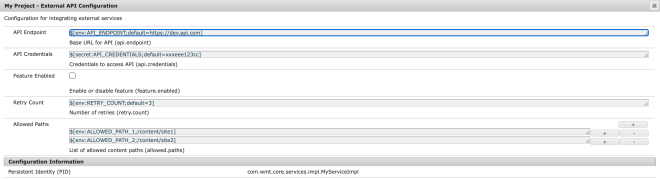
Below is a sample OSGI run mode specific configuration with all possible different data types that can be referenced which handling different data types.
A String array is a more complex use case. One naive approach is to treat it as a single string, as shown below, and then split it using a comma (,).
{
  "api.endpoint": "$[env:API_ENDPOINT;default=https://dev.api.com]",
  "api.credentials": "$[secret:API_CREDENTIALS;default=xxxeee123cc]",
  "feature.enabled": "$[env:FEATURE_ENABLED;default=false]",
  "retry.count": "$[env:RETRY_COUNT;default=3]",
  "allowed.paths": "$[env:ALLOWED_PATHS;default=/content/site1,/content/site2]"
}
Another approach is to use allowed paths as shown below, but I recommend evaluating it before proceeding, as it may create many environment variables.
{
  "allowed.paths": [
    "$[env:ALLOWED_PATH_1;/content/site1]",
    "$[env:ALLOWED_PATH_2;/content/site2]"
  ]
}
Sample Service Interface:-
Below is a sample service interface for accessing the implementation class.
package com.myproject.core.services;

public interface MyService {

    void execute();
}
Sample Service Implementation
Below is a sample service implementation class for testing our understanding.
package com.myproject.core.services.impl;

import com.myproject.core.config.MyServiceConfig;
import com.myproject.core.services.MyService;
import org.osgi.service.component.annotations.Activate;
import org.osgi.service.component.annotations.Component;
import org.osgi.service.component.annotations.Modified;
import org.osgi.service.metatype.annotations.Designate;
import org.slf4j.Logger;
import org.slf4j.LoggerFactory;

@Component(service = MyService.class, immediate = true)
@Designate(ocd = MyServiceConfig.class)
public class MyServiceImpl implements MyService {

 private static final Logger log = LoggerFactory.getLogger(MyServiceImpl.class);

    private String apiEndpoint;
    private String apiCredentials;
    private boolean featureEnabled;
    private int retryCount;
    private String[] allowedPaths;

    @Activate
    @Modified
    protected void activate(MyServiceConfig config) {
        this.apiEndpoint = config.api_endpoint();
        this.apiCredentials = config.api_credentials();
        this.featureEnabled = config.feature_enabled();
        this.retryCount = config.retry_count();
        this.allowedPaths = config.allowed_paths();

        log.info("MyService activated with configuration:");
        log.info("API Endpoint: {}", apiEndpoint);
        log.info("API Credentials: {}", apiCredentials);
        log.info("Feature Enabled: {}", featureEnabled);
        log.info("Retry Count: {}", retryCount);

        String[] paths = config.allowed_paths();
        if (paths != null && paths.length == 1) {
          // Fix: split single CSV string
          this.allowedPaths = paths[0].split(",");
        } else {
             this.allowedPaths = paths;
           }
   }

    @Override
    public void execute() {
        log.info("MyService activated with configuration:");
        log.info("API Endpoint: {}", apiEndpoint);
        log.info("API Credentials: {}", apiCredentials);
        log.info("Feature Enabled: {}", featureEnabled);
        log.info("Retry Count: {}", retryCount);

        if (allowedPaths != null) {
         for (String path : allowedPaths) {
             log.info("Allowed Path: {}" , path);
         }
       }
    }
}
Sample Servlet to Call the Service
package com.myproject.core.servlets;

import com.myproject.core.services.MyService;
import org.apache.sling.api.SlingHttpServletRequest;
import org.apache.sling.api.SlingHttpServletResponse;
import org.apache.sling.api.servlets.SlingSafeMethodsServlet;
import org.osgi.service.component.annotations.Component;
import org.osgi.service.component.annotations.Reference;
import org.slf4j.Logger;
import org.slf4j.LoggerFactory;

import javax.servlet.Servlet;
import java.io.IOException;

@Component(
        service = Servlet.class,
        property = {
                "sling.servlet.paths=/bin/myproject/myservice",
                "sling.servlet.methods=GET"
        }
)
public class MyServiceServlet extends SlingSafeMethodsServlet {

    private static final Logger log = LoggerFactory.getLogger(MyServiceServlet.class);

    @Reference
    private MyService myService;

    @Override
    protected void doGet(SlingHttpServletRequest request,
                         SlingHttpServletResponse response) throws IOException {

        log.info("MyServiceServlet triggered");

        response.setContentType("application/json");

        try {
            // Call service logic
            myService.execute();

            response.getWriter().write("{\"status\":\"success\",\"message\":\"Service executed successfully\"}");

            log.info("Service execution completed successfully");

        } catch (Exception e) {

            log.error("Error while executing service from servlet", e);

            response.setStatus(500);
            response.getWriter().write("{\"status\":\"error\",\"message\":\"Service execution failed\"}");
        }
    }
}
Testing OSGi Config Values:
In order to test the OSGi configuration values and print our custom loggers.
Navigate to :- http://localhost:4502/bin/myproject/myservice

06.05.2026 08:19:27.506 *INFO* [[0:0:0:0:0:0:0:1] [1778035767379] GET /bin/myproject/myservice HTTP/1.1] com.myproject.core.servlets.MyServiceServlet MyServiceServlet triggered
06.05.2026 08:19:27.522 *INFO* [[0:0:0:0:0:0:0:1] [1778035767379] GET /bin/myproject/myservice HTTP/1.1] com.myproject.core.services.impl.MyServiceImpl MyService activated with configuration:
06.05.2026 08:19:27.522 *INFO* [[0:0:0:0:0:0:0:1] [1778035767379] GET /bin/myproject/myservice HTTP/1.1] com.myproject.core.services.impl.MyServiceImpl API Endpoint: https://dev.api.com
06.05.2026 08:19:27.523 *INFO* [[0:0:0:0:0:0:0:1] [1778035767379] GET /bin/myproject/myservice HTTP/1.1] com.myproject.core.services.impl.MyServiceImpl API Credentials: xxxeee123cc
06.05.2026 08:19:27.523 *INFO* [[0:0:0:0:0:0:0:1] [1778035767379] GET /bin/myproject/myservice HTTP/1.1] com.myproject.core.services.impl.MyServiceImpl Feature Enabled: true
06.05.2026 08:19:27.523 *INFO* [[0:0:0:0:0:0:0:1] [1778035767379] GET /bin/myproject/myservice HTTP/1.1] com.myproject.core.services.impl.MyServiceImpl Retry Count: 3
06.05.2026 08:19:27.523 *INFO* [[0:0:0:0:0:0:0:1] [1778035767379] GET /bin/myproject/myservice HTTP/1.1] com.myproject.core.services.impl.MyServiceImpl Allowed Path: /content/site1,/content/site2
06.05.2026 08:19:27.532 *INFO* [[0:0:0:0:0:0:0:1] [1778035767379] GET /bin/myproject/myservice HTTP/1.1] com.myproject.core.servlets.MyServiceServlet Service execution completed successfully
💡 Pro Tip
AEM does implicit conversion from _ used in OCD to . in OSGI Config. If we use _ also in OSGI config then it won’t work as expected. Think of above mapping like this:
Java (OCD)        → OSGi Config        → Env Variable
------------------------------------------------------
api_endpoint      → api.endpoint       → API_ENDPOINT
retry_count       → retry.count        → RETRY_COUNT
🧠 Key Takeaways
- Stick to clean naming conventions (
UPPERCASE_WITH_UNDERSCORES) - Avoid reserved prefixes (
INTERNAL_,ADOBE_,CONST_) - Keep values within 2048 characters
- Plan your variables carefully due to the 200 variable limit
- Treat environment variables as deployment-time configuration, not runtime inputs
_in Java (OCD) → automatically becomes.- In OSGi config Always use dot notation in cfg.json . Using
_incfg.jsonwill break configuration mapping. - Environment variables must use
_(since.is not allowed) - Provide default values in env placeholders. This prevents deployment failures and ensures fallback behavior.
- Keep naming consistent and predictable
- JAVA → lower_case_with_underscore
- OSGi → dot.separated
- ENV → UPPER_CASE_WITH_UNDERSCORE
Leave a Reply