
AEM Project Archetype and Repository Structure for AEMaaCS
Most AEM as a Cloud Service (AEMaaCS) projects start with the same question: where does this file go? The answer determines whether your code deploys to the author and publish tiers, whether it survives an upgrade, and whether Cloud Manager accepts the build. Get it wrong and you spend a day debugging a package that installed into the wrong tree or was silently skipped.
In this lesson you generate a project with the official AEM project archetype, walk through every module it creates, and learn which package owns which part of the repository. By the end you will know why /apps is immutable, why configuration belongs in ui.config and not in ui.apps, and how the all package ties the deployment together.

Table of contents
- Why this matters
- Who should read this
- Prerequisites
- What the archetype generates
- Mutable and immutable repository paths
- Hands-on: generate and build the project
- The ui.apps package
- The ui.config package
- The ui.content package
- The core bundle
- The all container package
- Comparison table
- Common mistakes and troubleshooting
- Hands-on challenge
- Key takeaways
- Knowledge check
- Frequently asked questions
- Continue your learning
Why this matters
AEMaaCS is a managed service. Adobe runs the author and publish tiers, and you do not get shell access to the repository the way you did on AEM 6.5. Everything that changes the repository has to arrive as a content package built by your Maven build, and Cloud Manager deploys those packages through its pipelines. The project structure is the contract between your code and that deployment. Each Maven module produces a package with a fixed target path and a fixed package type, and the platform enforces the rules that come with them.
Two rules do most of the work. First, /apps and /libs are immutable on AEMaaCS, so code that writes there at runtime fails. Second, /content, /conf, /var and /etc are mutable, so content authors can change them. Your packages have to respect that split.
Who should read this
This lesson is for developers starting a new AEMaaCS project, and for anyone inheriting a project and trying to map its modules to the deployment. If you have built AEM 6.5 projects with the older multi-module archetype, the module names will look familiar, but several packages now have different roles and the all package works differently.
Prerequisites
- A JDK and Maven that match the requirements in the generated root
pom.xml. Check theenforce-mavenprofile in the root POM before you install anything. - Access to an AEMaaCS program and environment in Cloud Manager, if you want to deploy the result. The build itself runs without one.
- Lesson 04, Set Up AEMaaCS Local Development, so the AEM SDK, Maven and Java are already installed.
What the archetype generates
The AEM project archetype is published as com.adobe.aem:aem-project-archetype. At the time of writing, the latest version is 58, and that is the version used in this lesson. The archetype produces a root project with one parent POM and a set of child modules. The modules you will see most often are shown below.
| Module | Maven artifact role | What it contains | Deploys to |
|---|---|---|---|
all | Container package | Embeds the other packages. This is the only package you usually deploy by hand. | Cloud Manager deploys it. It installs its embedded packages from /apps/mysite-packages. |
core | OSGi bundle | Java code: Sling Models, services, servlets, schedulers, filters and tests. | Embedded in all at /apps/mysite-packages/application/install |
ui.apps | Application package | Immutable code: HTL components, dialogs, client libraries, i18n. | /apps/mysite |
ui.apps.structure | Repository structure package | Declares the root paths that the code packages are allowed to write to. The build uses it to validate ui.apps. | Nothing. It is used at build time and is not embedded in all. |
ui.config | Container package (package type container) | OSGi configurations per run mode and repoinit scripts. | /apps/mysite/osgiconfig |
ui.content | Content package | Sample and site content, /conf settings, DAM folders, experience fragments. | /content, /conf |
dispatcher | Dispatcher configuration | Dispatcher rules for the Cloud Service, including the vhost and filter files. | Dispatcher, not AEM |
The archetype also adds front-end and test modules, such as ui.frontend, ui.tests and it.tests, depending on the options you choose. The all package also embeds the AEM Core Components under /apps/mysite-vendor-packages. Check the root pom.xml after generation to see which modules you have.
Mutable and immutable repository paths
Before you write any file, know which paths the runtime can change. On AEMaaCS, /apps and /libs are immutable. Code packages write to /apps during deployment, and the platform blocks runtime writes there. Content, configuration instances and the other mutable trees can change at runtime through authors, workflows and services.
| Repository path | Mutable? | Who writes it | Where your code puts it |
|---|---|---|---|
/apps | Immutable | Deployment only | ui.apps, ui.config |
/libs | Immutable | Adobe | Nothing. Extend components, do not change them. |
/content | Mutable | Authors, services | ui.content (sample pages, experience fragments, DAM) |
/conf | Mutable | Authors, services | ui.content (site settings), ui.config (repoinit) |
/var | Mutable | The runtime | Nothing |
/oak:index | Mutable, but managed by the deployment | Cloud Manager deployment | Index definitions, deployed as code in a code package such as ui.apps |
The practical consequence is simple. If a value is part of the application (a component, a service configuration, a repoinit script), it belongs in a code or configuration package. If a value is content or site settings that an author should edit, it belongs in ui.content.
Hands-on: generate and build the project
In this section you generate a project named mysite with the group ID com.mysite. The archetype derives the Java package com.mysite.core from the group ID, so the names line up across the project.
Step 1: Generate the project
Run the archetype with Maven. The property names below are the archetype parameters. Set the values for your own project.
mvn -B org.apache.maven.plugins:maven-archetype-plugin:3.3.1:generate \
  -DarchetypeGroupId=com.adobe.aem \
  -DarchetypeArtifactId=aem-project-archetype \
  -DarchetypeVersion=58 \
  -DappId=mysite \
  -DgroupId=com.mysite \
  -DartifactId=mysite \
  -Dversion=1.0.0-SNAPSHOT \
  -DappTitle="MySite" \
  -DaemVersion=cloud \
  -DincludeDispatcherConfig=y
Maven creates a mysite folder. The appId sets the repository paths, such as /apps/mysite and /content/mysite. The groupId sets the Java package, and the aemVersion value cloud selects the AEMaaCS build.

Step 2: Build the project
Change into the project folder and run a full build. The first build downloads a lot of dependencies, and the front-end module may run npm, so allow a few minutes.
cd mysite
mvn clean install
Check the output for the reactor summary. Each module should show SUCCESS. The packages are written to the target folder of each module, for example ui.apps/target/mysite.ui.apps-1.0.0-SNAPSHOT.zip. Because the names come from the artifact ID, your file names will be different if you changed artifactId.

Step 3: Read the module layout
Open the generated tree and confirm the module folders. You should see the following layout. Pay attention to where the code and content sources live, because you will edit them in the next sections.
mysite/
├── pom.xml                      (root reactor POM, profiles)
├── all/                         (container package)
├── core/                        (OSGi bundle, Java)
│   └── src/main/java/com/mysite/core/
├── ui.apps/                     (immutable code and components)
│   └── src/main/content/jcr_root/apps/mysite/
├── ui.apps.structure/           (repository structure, build-time only)
├── ui.config/                   (OSGi configs and repoinit)
│   └── src/main/content/jcr_root/apps/mysite/osgiconfig/
├── ui.content/                  (site content and /conf)
│   └── src/main/content/jcr_root/content/mysite/
├── ui.frontend/                 (front-end build: webpack, npm)
├── ui.tests/ and it.tests/      (UI and integration tests)
└── dispatcher/                  (Dispatcher configuration)

The ui.apps package
ui.apps holds the code that the runtime needs, and nothing that an author should edit. The archetype places everything under /apps/mysite. Because /apps is immutable, every change to this package needs a new deployment, not an edit in the author UI.
ui.apps/src/main/content/jcr_root/apps/mysite/
├── clientlibs/          (CSS and JS client libraries)
├── components/          (HTL components, dialogs, component definitions)
│   └── hero/            (your custom component)
│       ├── .content.xml
│       ├── _cq_dialog/
│       └── hero.html
├── i18n/                (dictionaries)
└── .content.xml
A component in ui.apps has three important parts: the component definition in .content.xml, the HTL markup, and the dialog. The dialog is a Granite UI definition, and it belongs in the same package as the component because the author UI reads it from /apps.

The ui.config package
ui.config holds the OSGi configuration files and the repoinit scripts. Keeping configuration in its own package means you can change an endpoint or a credential for one run mode without rebuilding the component code. Run-mode folders under osgiconfig follow the pattern config.<author|publish>.<dev|stage|prod>. The archetype creates config, config.author, config.publish, config.stage and config.prod. Add other folders, such as config.author.dev, when you need them.
ui.config/src/main/content/jcr_root/apps/mysite/osgiconfig/
├── config/                       (all environments)
├── config.author/                (author tier only)
├── config.author.dev/            (author tier, dev environments; you add this one)
├── config.publish/               (publish tier only)
├── config.stage/                 (stage environment)
└── config.prod/                  (production environment)
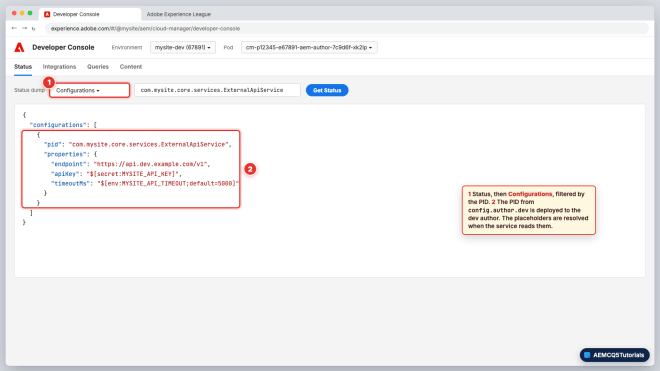
OSGi configuration files use the .cfg.json format. The file name is the PID, and the most specific run-mode folder wins for the whole PID. Values can reference an environment variable or a secret, so the same file works across environments without hard-coded credentials.
// ui.config/.../osgiconfig/config.author.dev/com.mysite.core.services.ExternalApiService.cfg.json
{
  "endpoint": "https://api.dev.example.com/v1",
  "apiKey": "$[secret:MYSITE_API_KEY]",
  "timeoutMs": "$[env:MYSITE_API_TIMEOUT;default=5000]"
}
The $[secret:NAME] form reads a secret that you set in Cloud Manager. The $[env:NAME;default=value] form reads an environment variable with a fallback. Use $[env:] for non-secret values that differ between environments, and $[secret:] for passwords and API keys. You set both per environment in Cloud Manager, under Environments, Configuration. Values that are the same for every environment of one type can go straight into the run-mode folder. The variable naming rules and the reserved prefixes are covered in Lesson 06, AEMaaCS OSGi Configurations and Environment Variables.
ui.config also holds repoinit scripts, which create service users, paths and ACLs at deployment time. Repoinit scripts are the scripts property of a org.apache.sling.jcr.repoinit.RepositoryInitializer factory configuration, for example org.apache.sling.jcr.repoinit.RepositoryInitializer~mysite.config. Adobe recommends the .config format here because it supports multi-line scripts. Keep the scripts small. The lesson on service users covers the syntax in depth: Create a service user in AEM as a Cloud Service.
The ui.content package
ui.content is a content package. It holds the pages, experience fragments, DAM folders and the /conf settings that the site needs to function. Its package type is content, and it depends on ui.apps because the content refers to components defined there.
ui.content/src/main/content/jcr_root/
├── content/mysite/                 (site root and sample pages)
├── content/experience-fragments/mysite/
├── content/dam/mysite/             (sample assets)
└── conf/mysite/
    ├── settings/                   (site settings and templates)
    └── _sling_configs/             (context-aware configurations, sling:configs in the JCR)
The conf folder is the most common surprise. Because it is mutable, authors can change site settings at runtime. Context-aware configurations, covered in Sling Context-Aware Configuration in AEM, live under /conf for this reason.
The core bundle
core is an OSGi bundle built with Maven. Its Java package is com.mysite.core, which the archetype derives from the group ID. The module contains Sling Models, services, servlets, schedulers, filters and the unit tests. Because it is a bundle rather than a content package, the all package embeds the JAR directly at /apps/mysite-packages/application/install, and AEM installs it from there.
core/src/main/java/com/mysite/core/
├── models/          (Sling Models, adaptable from Resource or SlingHttpServletRequest)
├── servlets/        (Sling servlets)
├── services/        (OSGi services; add this package yourself)
├── schedulers/      (Sling scheduled jobs)
└── filters/         (Sling filters)
core/src/test/java/com/mysite/core/
└── ...              (JUnit 5 tests, covered in the unit testing lesson)
The all container package
The all module is the one you deploy. It is a container package that embeds ui.apps, ui.config, ui.content and the core bundle in one archive, plus the Core Components as vendor packages. It must not contain code or content of its own. Cloud Manager and the local autoInstallSinglePackage profile both deploy this package.

Its POM declares the container type and embeds the other packages, so you do not add them to a deployment list by hand.
<!-- all/pom.xml (excerpt) -->
<packaging>content-package</packaging>
...
<plugin>
  <groupId>org.apache.jackrabbit</groupId>
  <artifactId>filevault-package-maven-plugin</artifactId>
  <configuration>
    <packageType>container</packageType>
    <embeddeds>
      <embedded>
        <groupId>com.mysite</groupId>
        <artifactId>mysite.ui.apps</artifactId>
        <type>zip</type>
        <target>/apps/mysite-packages/application/install</target>
      </embedded>
      <embedded>
        <groupId>com.mysite</groupId>
        <artifactId>mysite.ui.content</artifactId>
        <type>zip</type>
        <target>/apps/mysite-packages/content/install</target>
      </embedded>
      <!-- core and ui.config also go to /apps/mysite-packages/application/install -->
    </embeddeds>
  </configuration>
</plugin>
The other packages set cloudManagerTarget to none in their POMs, so Cloud Manager deploys them only as part of the all container. The filter.xml of the container must include a root for /apps/mysite-packages, or the embedded packages are not installed. The folder name decides where a package installs: application holds code packages, content holds content packages, and an install.author or install.publish folder limits a package to one tier. A dispatcher module does not produce a content package, so it sits outside this chain.

Comparison table
The table below compares the four packages you edit most often. Use it when you decide where a new file belongs.
| Question | ui.apps | ui.config | ui.content |
|---|---|---|---|
| What does it hold? | Components, clientlibs, i18n | OSGi configs, repoinit scripts | Pages, DAM, /conf settings |
| Target path | /apps/mysite | /apps/mysite/osgiconfig | /content, /conf |
| Package type | application | container | content |
| Changes at runtime? | No | No (OSGi configurations are deployed as code) | Yes, by authors |
| Change needs redeploy? | Yes | Yes | Only when you change the sample or the seed content |
| Typical owner | Front-end and component developers | Platform and DevOps | Content and site setup |
Common mistakes and troubleshooting
Most build and deployment problems with a new project fall into a handful of categories. The table lists the symptoms you are likely to see, the cause and the fix.
| Symptom | Likely cause | Fix |
|---|---|---|
| Components are missing on the author UI after deployment | Component was put in ui.content instead of ui.apps | Move the file to ui.apps/src/main/content/jcr_root/apps/mysite and redeploy the all package |
| Build fails with an enforcer error | JDK or Maven version does not match the enforce-maven profile | Install the version the root POM asks for, then run mvn clean install again |
| A request or job fails with an access error when it writes under /apps | Code tried to create nodes under /apps during a request | Move the write into a deployed package or a repoinit script |
| OSGi config is ignored on publish | File placed in config.author but the service runs on publish | Move the file to config.publish or to the shared config folder |
| Changes to a dialog do not appear | Old package still installed, or the file was edited in CRXDE Lite only | Edit the source in the repository, rebuild and redeploy. Never rely on edits in CRXDE Lite |
Note:- Edits made in CRXDE Lite to /apps are not kept on AEMaaCS. Treat CRXDE Lite as a read-only inspection tool for code and configuration, and make the change in the project.
Hands-on challenge
Add a new component called teaser and place a new OSGi configuration for it, then prove each file lands in the right tree.
- Create
ui.apps/src/main/content/jcr_root/apps/mysite/components/teaser/with a.content.xmland ateaser.htmlfile. - Create a configuration file named
com.mysite.core.services.TeaserConfig.cfg.jsoninconfig.authorwith one property. The local SDK runs as author without a dev run mode, soconfig.author.devwould not apply on your laptop. - Add a sample page under
ui.content/src/main/content/jcr_root/content/mysite/us/en/teaser-demo. - Run
mvn clean installfrom the root and open theall/targetfolder. Confirm that the zip contains all three additions. - Deploy to your local instance with
mvn clean install -PautoInstallSinglePackageand confirm the component appears in the page editor.
Success criteria: the component is under /apps/mysite/components, the sample page is under /content/mysite, and the configuration is listed in the Web Console at http://localhost:4502/system/console/configMgr. On a cloud environment, use Developer Console, Status, Configurations instead.
Key takeaways
- The archetype creates a root project with one module per deployable concern, and
allbundles them into one container package. /appsand/libsare immutable. Code, components and configuration belong in code packages./content,/conf,/varand/etcare mutable. Site content and settings that authors edit belong inui.content.- OSGi configuration lives in
ui.config, one folder per run mode, and uses$[secret:]and$[env:]instead of hard-coded values. - Always edit the source in the project and redeploy. Changes made only in CRXDE Lite do not survive a deployment.
Knowledge check
1. Which two repository paths are immutable on AEMaaCS?
/apps and /libs. Code packages deploy to /apps, and the runtime cannot write there.
2. In which module does a new OSGi configuration file for a service belong?
ui.config, under osgiconfig/config or a run-mode folder such as config.publish.prod.
3. Why does ui.content depend on ui.apps?
Because the pages and experience fragments in ui.content reference components that are defined in ui.apps. Without those components, the content cannot render.
4. What does the all module do?
It is a container package that embeds the other packages, so one deployment installs the whole project. Its target and package type are set in its POM.
5. Where does the Java package com.mysite.core come from when you use the archetype?
From the groupId property. The archetype derives ${package} from the group ID, so com.mysite produces com.mysite.core for the core module.
Frequently asked questions
Can I put a component in ui.content to make it easier to edit?
No. Components are code, and code belongs in ui.apps under /apps. Content that uses the component belongs in ui.content.
Why does my build produce a zip for every module?
Each Maven module that uses the content-package packaging produces a package. The all package embeds them, so deploy all rather than each module.
Continue your learning
- Previous lesson: Lesson 04, Set Up AEMaaCS Local Development.
- Next lesson: Lesson 06, AEMaaCS OSGi Configurations and Environment Variables, which goes deeper into
ui.config. - Later in Module 2: Lesson 09, Sling Context-Aware Configuration in AEM, which builds on the
ui.contentandcorestructure from this post. - Practice quiz: AEM Development practice test 1.
- Roadmap: AEM Cloud learning roadmap.
Leave a Reply